As businesses scale, their financial operations become more complex. Manual accounting processes or entry-level software often fail to provide the visibility, automation, and control needed for growth. This is where Sage Intacct stands out.
In this guide, we’ll explain what Sage Intacct is, how it works, its key features, major benefits, and the best alternatives to consider.
What Is Sage Intacct?
Sage Intacct is a cloud-based financial management and accounting software designed primarily for growing and mid-sized businesses. Unlike basic accounting tools focused on bookkeeping, Sage Intacct is built to handle complex financial operations, including multi-entity accounting, revenue recognition, automation, and real-time reporting. Sage Intacct is part of the Sage product ecosystem and is widely recognized as a best-in-class cloud financial management platform. It is often used by organizations that have outgrown entry-level accounting systems and need deeper financial insight, scalability, and compliance support.
Who Uses Sage Intacct?
Sage Intacct is best suited for:
- Growing small and mid-sized businesses
- Finance-driven organizations with complex reporting needs
- Companies operating multiple entities, locations, or departments
- Subscription-based and service-based businesses
- Nonprofits and professional service firms
- Organizations preparing for audits, funding, or rapid growth
Businesses typically adopt Sage Intacct when spreadsheets or basic accounting software can no longer support their operational and reporting requirements.
How Sage Intacct Works
Sage Intacct is 100% cloud-native, meaning all financial data is stored securely online and accessible anytime, anywhere. Users log in through a web browser to manage accounting tasks, collaborate with teams, and generate real-time financial reports. At its core, Sage Intacct:
- Centralizes all financial data
- Automates accounting workflows
- Applies standardized accounting rules
- Provides real-time dashboards and analytics
Because it’s cloud-based, there’s no local installation, no manual updates, and no dependency on physical servers.
Key Features Of Sage Intacct
Sage Intacct is known for its depth and automation. Below are the most important features that define the platform.
1. Advanced General Ledger
Sage Intacct’s general ledger is highly flexible and supports:
- Multi-entity and multi-currency accounting
- Dimensional accounting (departments, locations, projects, customers)
- Real-time posting and consolidation
This allows finance teams to view performance from multiple angles without duplicating accounts.
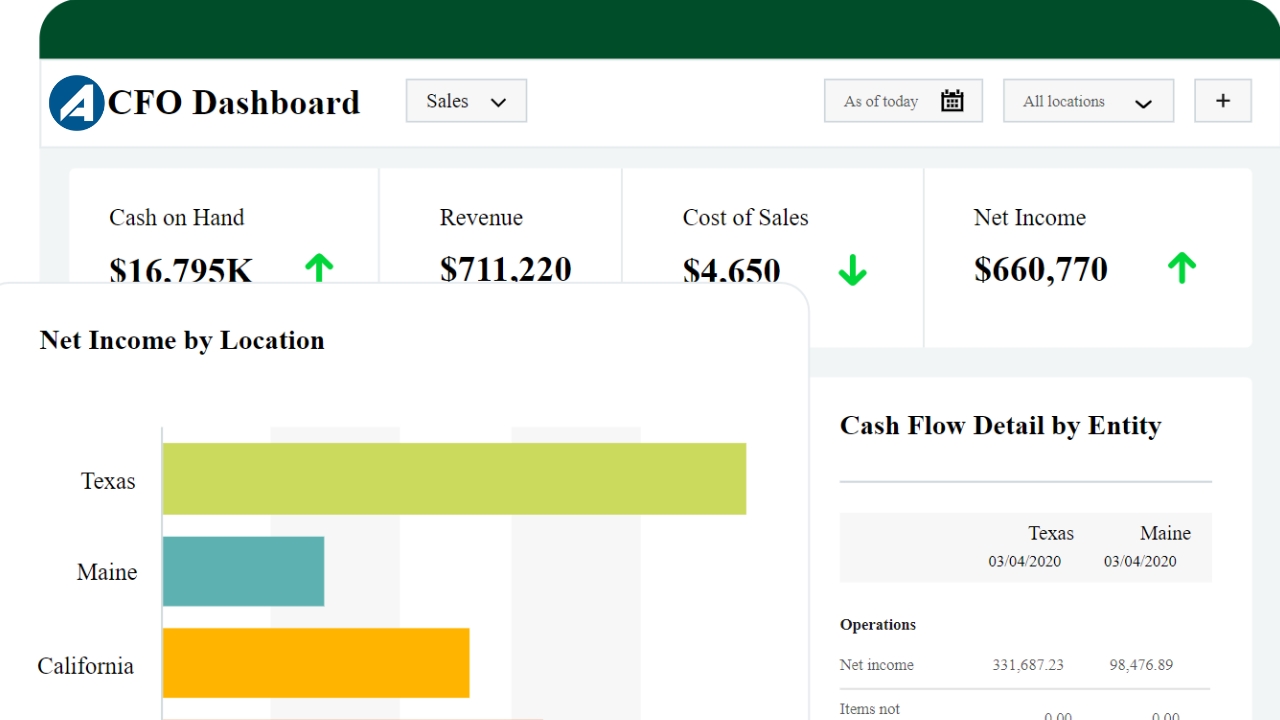
2. Real-Time Financial Reporting & Dashboards
One of Sage Intacct’s strongest features is its reporting engine. Users can generate:
- Profit and loss statements
- Balance sheets
- Cash flow reports
- Budget vs actual comparisons
- Custom dashboards with KPIs
Reports update in real time, enabling faster and more accurate decision-making.
3. Multi-Entity & Global Consolidation
Sage Intacct is designed for organizations with complex structures. It supports:
- Multiple legal entities
- Automated intercompany transactions
- Global consolidations in minutes instead of days
- Currency conversions and eliminations
This feature is especially valuable for growing companies and international organizations.
4. Accounts Payable & Accounts Receivable Automation
Sage Intacct automates key AP and AR processes, including:
- Vendor bill management
- Automated approvals and workflows
- Customer invoicing and collections
- Payment tracking and aging reports
Automation reduces manual work, errors, and processing delays.
5. Revenue Recognition (ASC 606 / IFRS 15)
For subscription and contract-based businesses, Sage Intacct provides built-in revenue recognition automation. This includes:
- Compliance with ASC 606 and IFRS 15
- Automated revenue schedules
- Deferred revenue tracking
- Audit-ready documentation
This makes Sage Intacct particularly attractive to SaaS and service-based companies.
6. Budgeting, Forecasting & Planning
Sage Intacct supports:
- Multi-dimensional budgeting
- Forecasting and scenario planning
- Department-level and project-level budgets
Finance teams can quickly compare planned vs actual performance and adjust strategies accordingly.
7. Cloud Security & Access Control
Security is a core strength of Sage Intacct. Key security features include:
- Role-based user permissions
- Data encryption
- Audit trails
- Secure cloud infrastructure
These features ensure sensitive financial data remains protected and compliant.
Benefits Of Using Sage Intacct
Choosing Sage Intacct delivers several long-term business advantages.
- 1. Scales With Business Growth : Sage Intacct grows with your organization—handling more users, entities, and transactions without requiring a system change.
- 2. Improves Financial Visibility : Real-time dashboards and reports give leadership instant insight into financial health and performance.
- 3. Reduces Manual Work : Automation across accounting workflows saves time and reduces human error.
- 4. Faster Month-End Close : Many businesses significantly reduce close times with Sage Intacct’s automated reconciliations and consolidations.
- 5. Supports Compliance & Audits : Built-in controls, audit trails, and standardized reporting simplify audits and regulatory compliance.
- 6. Cloud Accessibility : Finance teams can work remotely, collaborate easily, and access data anytime without VPNs or local servers.
Sage Intacct vs Traditional Accounting Software
Unlike desktop or entry-level accounting tools, Sage Intacct is designed for financial management, not just bookkeeping.
| Area | Traditional Accounting Software | Sage Intacct |
|---|---|---|
| Deployment | Desktop or limited cloud | 100% cloud |
| Scalability | Limited | High |
| Reporting | Basic | Advanced, real-time |
| Multi-Entity | Manual | Automated |
| Automation | Limited | Extensive |
This makes Sage Intacct a strong choice for organizations planning long-term growth.
Is Sage Intacct Right For Your Business?
Sage Intacct is a great fit if:
- Your business has outgrown basic accounting tools
- You need detailed, real-time financial reporting
- You manage multiple entities or departments
- Compliance and audit readiness are important
- You want a future-ready cloud financial system
However, very small businesses or freelancers may find it more powerful—and costly—than necessary.
Sage Intacct Alternatives
While Sage Intacct is powerful, it’s not the only option. Below are some popular alternatives, depending on business size and needs.
1. NetSuite : A full ERP solution with accounting, inventory, and operations management—often suited for larger enterprises.
2. QuickBooks Online Advanced : Best for growing small businesses that need enhanced reporting but not full enterprise complexity.
3. Xero : A user-friendly cloud accounting tool for small to mid-sized businesses with simpler needs.
4. Microsoft Dynamics 365 Business Central : An ERP-focused alternative offering accounting, operations, and CRM integration.
Each alternative serves a different stage of business growth, but Sage Intacct remains one of the strongest options for finance-led organizations.
Final Thoughts
So, what is Sage Intacct?. It’s a powerful, cloud-based financial management platform built for growing businesses that need more than basic accounting. With advanced reporting, automation, multi-entity support, and compliance-ready features, Sage Intacct helps organizations gain control, visibility, and confidence in their financial operations.
At aenten, we recommend Sage Intacct for businesses that are serious about scaling, improving financial insight, and building a strong foundation for long-term success.